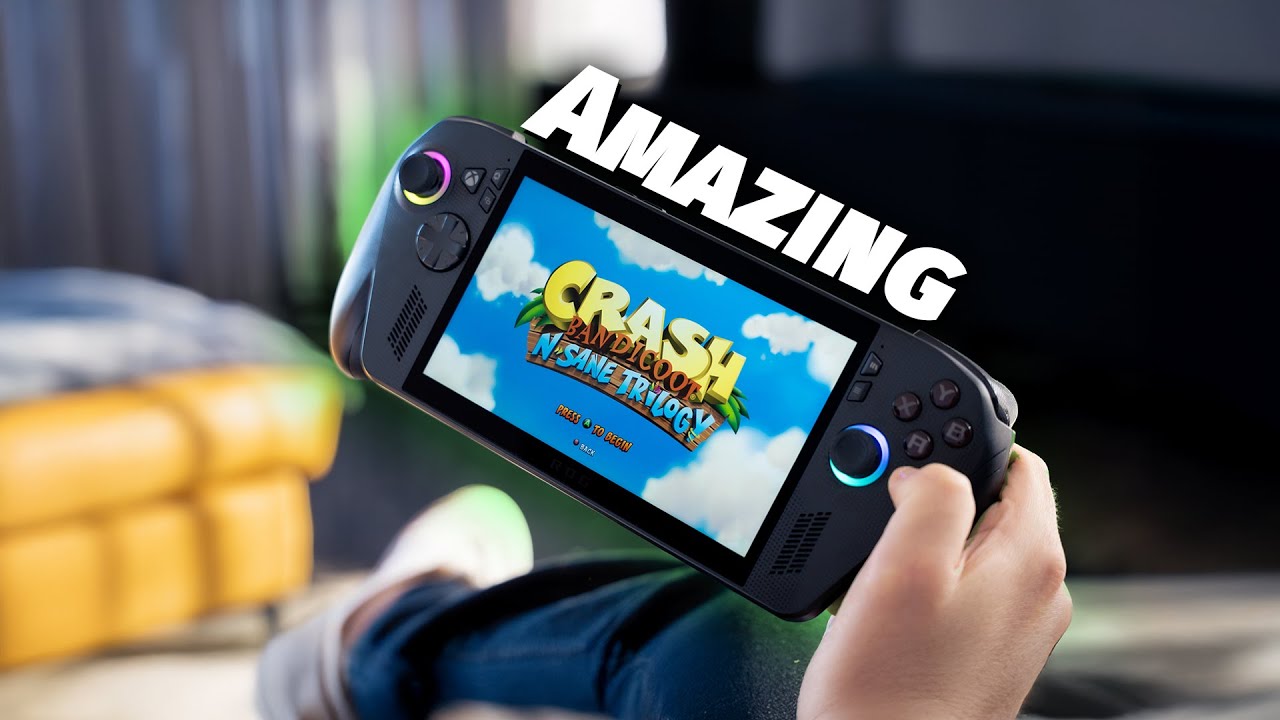
Short answer: the ASUS ROG Xbox Ally X is one of the best Windows gaming handhelds you can buy, and the most comfortable ROG Ally I’ve used. But despite the Xbox branding, it isn’t a true Xbox console experience. It’s a better ROG Ally X running Windows. I used it for over a week, and this is what I found.
What is the ROG Xbox Ally X?
It’s Xbox’s first branded handheld, built by ASUS. It’s essentially a better ROG Ally X with some Xbox branding added, and even though that isn’t exactly what I expected, it’s a really good device.
Design and comfort
ASUS made some massive improvements here. The new, more comfortable handles are the biggest change, and I mean it when I say this is the most comfortable ROG Ally I’ve used to date. I own the original ROG Ally and have tested the ROG Ally X, so I know how an Ally feels in the hand. This one feels a whole lot better, and it has more of an angle than the original Allies, which helps a little as well.
There’s a lot of Xbox branding too, from small icons on the front face to a ROG-style grip at the back. The biggest addition is a dedicated Xbox button on the front:
- A press opens the Xbox Game Bar, a quick-access overlay for switching apps, capturing screenshots or videos, checking system performance and accessing your friends list
- A long press opens the app switcher for moving between your open applications
Software: Xbox app and the Windows Fullscreen Experience
Instead of Armoury Crate as your default home app, you now find your games in the Xbox Windows app, which looks cleaner and reinforces the Xbox branding. That is largely where the Xbox side of things ends.
The Windows Fullscreen Experience is probably one of the best updates. It lets the Ally boot directly into a fullscreen interface without loading all the unnecessary Windows background tasks, saving up to 2GB of RAM, which makes a massive difference on a handheld. It’s also where you launch your games from. It isn’t a console-like experience with quick resume, though. If you launch a Steam game, for example, Steam loads first.
Specs
- 7-inch full HD touch display
- AMD Ryzen AI Z2 Extreme chip
- 24GB of DDR5X RAM
- 1TB SSD
- 80Wh battery, the same as the ROG Ally X and double the original Ally
Battery life sits between the original and the Ally X in practice, at roughly two to five hours depending on the games you play and how you use it.
Gaming performance
Half the appeal of a device like this for me is playing chill or story-based games like Crash Bandicoot and Spyro the Dragon, which are childhood favorites, and playing them on a handheld just feels better. It also has the power for newer games. Spider-Man 2 ran like a charm, and so did Black Myth: Wukong and Borderlands 4. Everything I tested ran buttery smooth.
For competitive games, I did a few runs of Call of Duty zombies and multiplayer. They ran really well, with the odd hiccup here and there, and the handheld felt responsive.
Is it a true Xbox handheld?
My biggest problem is that nothing about it is inherently Xbox. Game Pass is still just PC Game Pass, not Xbox Game Pass. The Xbox logo, the Xbox app replacing Armoury Crate, the colors and the name all say Xbox, but at heart it’s still a ROG Ally. Xbox Remote Play exists, but you’d still need an Xbox, and you can’t play all your Xbox games on it.
It still runs Windows, so you can play your Steam, Epic and Battle.net games, and run emulators to play the games you grew up with. For me, that’s half the appeal of an Ally. The risk is that people think it’s an Xbox handheld and expect Xbox Game Pass at minimum, which it doesn’t have. I’d have loved Microsoft to find a way to register it as a compatible device.
Who should buy it (and who should skip it)
Buy it if:
- You want one of the best Windows gaming handhelds on the market
- You want a more comfortable Ally with an easier route into the Xbox and Game Pass platform
- You like playing Steam, Epic, Battle.net and emulated games on the go
Skip it if: you expect a console-like Xbox experience with Xbox Game Pass, quick resume and your Xbox library. It doesn’t offer that.
Frequently asked questions
Is the ROG Xbox Ally X a real Xbox?
Not in the console sense. It has Xbox branding, a dedicated Xbox button and the Xbox app, but it runs Windows and uses PC Game Pass, not Xbox Game Pass.
Can the ROG Xbox Ally X play Steam games?
Yes. It runs Windows, so you can use Steam, Epic and Battle.net, and run emulators as well.
How long does the ROG Xbox Ally X battery last?
Roughly two to five hours, depending on what you play. It has an 80Wh battery, the same as the ROG Ally X and double the original Ally.
What is the Windows Fullscreen Experience?
It’s a fullscreen interface that boots without loading unnecessary Windows background tasks, saving up to 2GB of RAM, which makes a big difference on a handheld.
Is the ROG Xbox Ally X better than the ROG Ally X?
It’s the same form factor and does everything the Ally X does, just better. The most noticeable upgrade is comfort, thanks to the new handles and angle.
Final verdict
If you like Windows handhelds, this is an amazing one, and I can’t really fault the hardware. Just don’t buy it expecting an Xbox. What do you think of the Xbox Ally X? Tell me in the YouTube comments.
Watch the full video on YouTube | ASUS ROG Xbox Ally X on Amazon
Disclosure: the Amazon link above is an affiliate link. If you buy through it, I earn a small commission at no extra cost to you, which helps support the channel.